Woodturning Simulator
Woodturning Simulator
About this game — overview & description
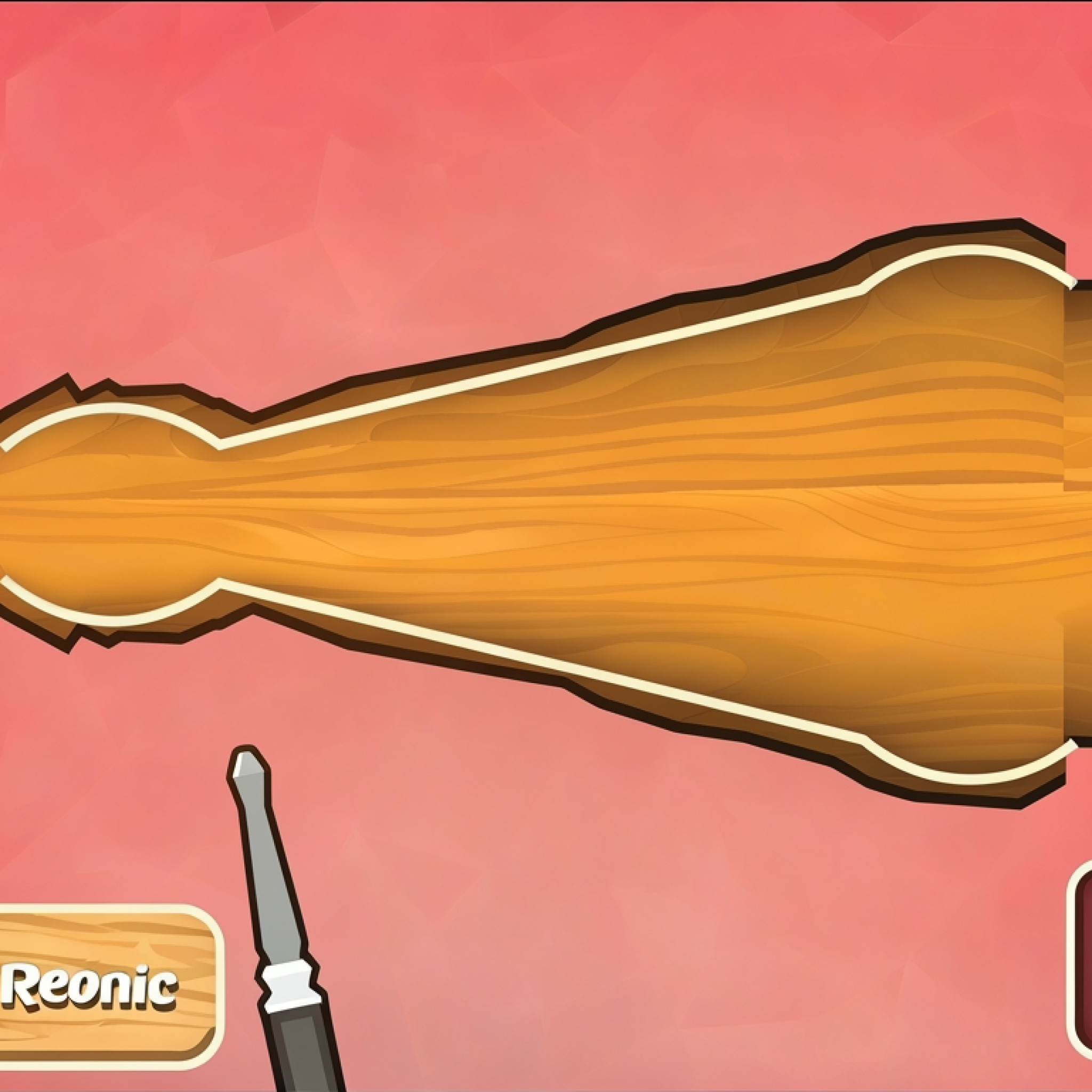
The highly engaging and deeply immersive Woodturning Simulator offers players a unique opportunity to delve into the captivating world of craftsmanship, all from the convenience of their web browser. This cutting game is designed to be both enticing and profoundly addicting, making it virtually impossible to put down once you start. Players are invited to effortlessly cut through virtual wooden patterns, refine their spatial reasoning and precision skills, and ultimately master the art of producing extraordinary wooden goods. Take a well-deserved break from the daily routine, unwind with a truly satisfying creative outlet, and demonstrate your innate creativity and meticulous skill by crafting exquisite wooden objects of breathtaking beauty. This exceptional simulation experience is available for free play directly on deployment-game.com, requiring no downloads or installations, providing instant access to its compelling gameplay.
What is Woodturning Simulator? – Complete Game Overview
Woodturning Simulator is a captivating and highly detailed crafting simulation game that places players in the role of a skilled woodturner. The core objective is to transform rough blocks of wood into finely sculpted, aesthetically pleasing objects using a virtual lathe and an array of specialized tools. This game transcends mere entertainment, acting as a digital workshop where creativity meets precision. Every cut, every rotation, and every sanding motion contributes to the final masterpiece, making the process incredibly rewarding. The journey from a raw wooden block to a polished artifact is central to the appeal of this digital woodworking experience.
The game environment provides a realistic portrayal of a woodturning workshop, allowing players to focus entirely on the artistic process. From selecting the initial block of wood to applying the final polish, every step is designed to be intuitive yet challenging. Players will learn to identify the best angles for cuts, understand the impact of different tools, and develop an eye for symmetry and proportion. The goal extends beyond simply completing an object; it’s about achieving perfection in form, texture, and finish. Woodturning Simulator offers a truly immersive and relaxing escape, fostering both artistic expression and a keen sense of accomplishment with each completed project.
How to Play Woodturning Simulator – Step-by-Step Guide
Getting Started with Woodturning Simulator
Embarking on your woodturning journey within Woodturning Simulator is straightforward and user-friendly. Upon launching the game, you’ll be presented with a virtual workshop setting, complete with a robust wood lathe. Your first step involves selecting a block of wood from the available options. Each wood type might have subtle differences in texture or grain that affect the visual outcome. Once chosen, the wood block is securely mounted onto the lathe, ready for transformation. The initial phase is about familiarizing yourself with the interface, identifying your available tools, and preparing for your first creative endeavor in this engaging Woodturning Simulator game.
Before making your first cut, it’s beneficial to visualize the general shape you intend to create. The game often provides outlines or basic templates as guidance, especially for beginners. Don’t be afraid to experiment with different wood types and initial forms to understand how they react to your tools. The learning curve is gentle, encouraging exploration and discovery. Taking a moment to plan your cuts and consider the overall design will significantly enhance your experience and the quality of your finished product in the Woodturning Simulator online environment.
Basic Controls and Gameplay
Mastering the basic controls in Woodturning Simulator is key to enjoying the cutting and shaping process. The primary interaction involves using your mouse or touch screen to manipulate the various virtual tools against the spinning wood block. Typically, you’ll click and drag to apply pressure with chisels, gouges, and scrapers, carefully carving away material. The speed of the lathe can often be adjusted, allowing for finer details or faster removal of larger sections. Pay attention to the visual feedback as you carve; dust and shavings will fly, indicating successful material removal.
Beyond the cutting tools, you’ll also have access to sanding implements to smooth out rough surfaces and polishing agents to give your creation a brilliant sheen. The intuitive interface ensures that even novices can quickly grasp the mechanics. Experiment with different tools to see their unique effects on the wood. Precision and patience are your best allies here; rushing through cuts can lead to mistakes that are difficult to correct. The core gameplay loop of this Woodturning Simulator game revolves around a satisfying cycle of shaping, refining, and finishing, making each step enjoyable.
Advanced Woodturning Simulator Techniques
Once you’ve mastered the fundamentals, Woodturning Simulator offers ample opportunity to explore more advanced techniques, elevating your creations from simple forms to intricate masterpieces. This involves a deeper understanding of tool dynamics and a more deliberate approach to design. Experiment with different angles and depths of cut to achieve varied textures and contours. Learning to blend transitions seamlessly between different carved sections is a hallmark of an experienced player. Utilize smaller, finer tools for detailed work, such as etching patterns or carving delicate edges.
Advanced players in the Woodturning Simulator often focus on achieving perfect symmetry and balance, which requires a steady hand and a keen eye. Consider incorporating negative space into your designs, carving out sections to create more complex, open forms. Don’t underestimate the power of different sanding grits and polishing compounds; they can dramatically alter the final appearance and feel of your wooden object. Developing a personal style and pushing the boundaries of what you can create within the Woodturning Simulator is part of the game’s enduring appeal, encouraging continuous improvement and artistic growth.
Woodturning Simulator Game Features and Highlights
The Woodturning Simulator experience is enriched by a suite of well-designed features that elevate it beyond a simple casual game, transforming it into a genuinely engaging crafting simulation. These elements work in harmony to provide a satisfying and deep gameplay loop for creative individuals. From the tactile sensation of shaping wood to the visual gratification of a perfectly polished piece, every aspect contributes to its undeniable charm. The game’s commitment to detail in its features ensures a high level of immersion and replayability.
- Realistic Physics and Tools: Experience authentic cutting dynamics as tools interact with virtual wood, creating satisfying shavings and realistic shaping effects. A wide array of chisels, gouges, and sandpapers replicate real-world woodturning implements.
- Diverse Wood Types: Choose from various virtual wood species, each potentially offering a unique grain pattern and subtle differences in how they respond to your tools, influencing the aesthetic of your final product.
- Intuitive Control Scheme: Designed for accessibility on both desktop and mobile, the controls allow for precise and natural manipulation of tools, making the creative process fluid and enjoyable for all skill levels.
- Creative Freedom: Unleash your imagination with the freedom to sculpt virtually any shape or design you can envision. There are no strict templates, encouraging pure artistic expression and individual style.
- Satisfying Progression System: Witness your skills improve with each creation, moving from basic shapes to intricate designs. The game provides a clear sense of accomplishment as you master advanced techniques.
Each feature of the Woodturning Simulator contributes to its captivating nature. The realistic physics, for example, aren’t just for show; they teach players about the intricacies of working with wood, like avoiding too much pressure or understanding the direction of the grain. The variety of wood types adds a strategic layer, as different woods might inspire different designs or require adjusted techniques. The intuitive controls ensure that the focus remains on creativity rather than struggling with complex mechanics, making the game accessible yet profound. Moreover, the inherent creative freedom is a huge draw, allowing players to truly make the game their own. This holistic approach to design makes the Woodturning Simulator an exemplary title in the simulation genre, offering endless hours of constructive and relaxing play.
Why Players Keep Coming Back to Woodturning Simulator
Players consistently return to Woodturning Simulator for a multitude of compelling reasons, primarily centered around its unique blend of relaxation, creative expression, and skill refinement. The game provides a genuinely therapeutic escape from the stresses of daily life, offering a calm and focused activity that allows the mind to wander creatively while engaging in a satisfying task. The fundamental appeal lies in the transformation process—taking a raw, unformed block of wood and meticulously shaping it into something beautiful and unique. This inherent sense of creation and accomplishment is a powerful draw for a general audience seeking more than just fast-paced action. It appeals to those who appreciate thoughtful engagement and the joy of making.
The replayability of the Woodturning Simulator is incredibly high, stemming from the endless possibilities for design and the continuous pursuit of perfection. There’s no single “right” way to play; each session offers a fresh canvas for a new idea, a different shape, or a more intricate pattern. The game’s skill curve is also a significant factor; while easy to pick up, mastering the subtle nuances of tool control and design requires dedication, providing a constant challenge that keeps players engaged. Furthermore, the inherent chill factor of the game makes it perfect for winding down, offering a meditative experience without the pressure of time limits or competitive elements. Whether you’re aiming for a simple, elegant bowl or a complex, multi-layered sculpture, the Woodturning Simulator offers an unparalleled sense of personal growth and creative satisfaction with every turn of the lathe.
Pro Tips and Strategies for Woodturning Simulator
Beginner Tips
For newcomers to the Woodturning Simulator, starting simple is the golden rule. Begin by focusing on creating basic, symmetrical shapes like bowls or cylinders. Don’t try to tackle intricate designs right away. Familiarize yourself with the primary cutting tools – the roughing gouge for initial shaping and the skew chisel for smoothing. Always make light, controlled cuts rather than trying to remove large amounts of material at once; this prevents errors and allows for greater precision. Pay attention to the profile of your object as it spins, ensuring even material removal. Remember that patience is a virtue in this Woodturning Simulator game, as careful movements lead to better results.
Another crucial tip for beginners is to utilize the undo feature if available, or simply restart if a design goes awry. The goal in the early stages is to understand how each tool affects the wood. Experiment with different pressure levels and angles. Don’t forget to sand your creations thoroughly; a smooth finish can elevate even the simplest design. Finally, enjoy the process! The Woodturning Simulator is designed to be a relaxing and creative outlet, so embrace the learning journey and celebrate each completed piece, no matter how basic it may seem.
Intermediate Strategies
As you gain confidence in Woodturning Simulator, you can begin to incorporate intermediate strategies to refine your craft. Start thinking about combining different tools to achieve specific effects. For instance, use a spindle gouge for curves and then switch to a parting tool for creating distinct grooves or sections. Focus on achieving smoother transitions between different carved areas, making your objects look seamless and professionally finished. Understanding the properties of different virtual wood types available can also inform your design choices; some might be better suited for fine details, while others excel in broad, sweeping curves.
A key intermediate strategy in the Woodturning Simulator is planning your design more thoroughly before you even touch a tool. Sketch out your desired shape mentally or even physically if you prefer. This foresight helps you anticipate challenges and execute your vision more efficiently. Experiment with undercuts and subtle variations in thickness to add visual interest. Pay close attention to balance and proportion, ensuring your finished piece looks harmonious from all angles. Mastering these intermediate techniques will significantly enhance the complexity and beauty of your creations within the Woodturning Simulator online environment.
Expert Woodturning Simulator Secrets
To truly master Woodturning Simulator and produce objects of unparalleled beauty, expert players delve into the finer details of the craft. This involves meticulous precision and an intimate understanding of every tool’s capability. Experts often utilize specialized tools for intricate details, such as carving miniature patterns or creating delicate finials. They understand how to achieve specific textures, perhaps leaving a subtle tooling mark for an artistic effect, or creating an unbelievably smooth, mirror-like polish through careful sanding and finishing techniques. Achieving perfect symmetry in complex, asymmetrical designs is another hallmark of an expert woodturner.
One of the most important secrets for advanced players in the Woodturning Simulator is patience and a willingness to constantly iterate. Don’t be afraid to scrap a nearly finished piece if it doesn’t meet your high standards. Learn to “read” the virtual wood, understanding how different pressure points affect the grain. Experiment with color, if the game allows, or consider how light will interact with your finished surfaces. Finally, experts often look for inspiration outside the game, studying real-world woodturning art to push their own creative boundaries. By embracing these expert Woodturning Simulator secrets, you can transform your virtual workshop into a genuine art studio, producing truly stunning wooden creations.
Woodturning Simulator vs Other Similar Games
Woodturning Simulator distinguishes itself within the broad genre of simulation games by offering a uniquely focused and profoundly calming experience, setting it apart from more action-oriented or resource-management titles. While games like Mafia Sniper Crime Shooting offer intense, fast-paced action and strategic combat, the Woodturning Simulator provides a meditative counterpoint. It isn’t about overcoming enemies or managing complex economies; it’s about the serene act of creation. This singular focus on crafting and artistic expression makes it appealing to a different demographic, one that values tranquility and the satisfaction of building something tangible, even if virtual.
Compared to other craft-based simulations or even other general simulation games, the Woodturning Simulator emphasizes tactile feedback and visual aesthetics. While games like Kung Fu Panda Paw some Panda deliver an adventurous, character-driven narrative, the Woodturning Simulator’s narrative is entirely player-driven, unfolding with each new design. Its closest cousins might be other crafting or art creation games, but even among those, the specific niche of woodturning offers a distinct methodology and aesthetic outcome. It provides a unique balance of challenge and relaxation, demanding precision but without punishing failure harshly, unlike the quick reflexes needed in games such as Run Jerry. This makes the Woodturning Simulator a standout for players seeking a deeply satisfying and creatively stimulating experience that fosters a sense of accomplishment through meticulous craftsmanship.
Technical Requirements for Woodturning Simulator
One of the significant advantages of playing Woodturning Simulator on deployment-game.com is its minimal technical requirements, making it incredibly accessible to a wide audience. The game is built using modern HTML5 technology, meaning it runs directly within your web browser. This eliminates the need for any downloads, installations, or dedicated gaming hardware, providing an instant play experience. Simply navigate to the game page, and you can begin crafting immediately. This browser-based approach ensures compatibility across a vast range of devices and operating systems.
Whether you’re using a desktop PC, a laptop, a tablet, or a smartphone, the Woodturning Simulator is designed to adapt seamlessly. It is fully optimized for both mobile devices and desktop computers, offering responsive controls that translate well to touchscreens and traditional mouse-and-keyboard setups. For a truly immersive experience, players have the option to engage in full-screen mode, allowing the virtual workshop to fill your display without distractions. The game’s efficient design means it typically requires only a stable internet connection and a relatively modern web browser to run smoothly, ensuring that almost anyone can enjoy the satisfying art of virtual woodturning without technical hurdles.
Frequently Asked Questions About Woodturning Simulator
Is Woodturning Simulator Free to Play?
Yes! Woodturning Simulator is completely free to play on deployment-game.com. No downloads, no registration, no hidden costs. You can access the full game experience without any financial barriers, diving straight into the creative process of virtual woodturning as often as you like. This commitment to free-to-play ensures that the joy of crafting is available to everyone.
Can I Play Woodturning Simulator on Mobile?
Absolutely! Woodturning Simulator is fully optimized for mobile devices, including smartphones and tablets. The game’s intuitive controls are designed to work seamlessly with touchscreens, allowing you to sculpt and refine your wooden creations with just your fingertips. This cross-platform compatibility means you can enjoy the relaxing and creative gameplay of Woodturning Simulator wherever you go, turning any spare moment into an opportunity for artistic expression. Play it on the bus, during a coffee break, or from the comfort of your couch.
Is Woodturning Simulator Suitable for Casual Play?
Yes, Woodturning Simulator is perfectly suited for casual play. Its design emphasizes a relaxed pace, allowing players to engage with the game at their own leisure without any pressure or time constraints. There are no competitive elements, harsh penalties for mistakes, or complex storylines to follow, making it an ideal choice for unwinding after a long day. The game provides a calming and focused activity, offering a satisfying sense of accomplishment with each completed wooden object, whether you spend five minutes or an hour shaping your masterpiece. It’s a great option for those who enjoy Casual games.
Start Playing Woodturning Simulator Now!
Are you ready to unleash your inner artisan and experience the profound satisfaction of crafting beautiful objects from virtual wood? The opportunity awaits you right now with Woodturning Simulator! This engaging, free-to-play, and incredibly addicting game is just a click away, offering an unparalleled creative escape. Dive into the world of precision and artistry, transforming simple blocks into stunning masterpieces that reflect your unique vision. With no downloads required and instant access directly in your browser, there’s nothing holding you back from starting your woodturning journey today. Experience the joy of creation, refine your skills, and let your imagination run wild. Head over to deployment-game.com now and begin shaping your first extraordinary wooden creation in the captivating Woodturning Simulator!
Controls & how to play (HTML5)
Use mouse, keyboard, or touch—this deployment-game.com title shows its own on-screen prompts and hints.









Loading comments from deployment-game.com…